


The major AI overhaul of Siri was undoubtedly the highlight of Apple’s Worldwide Developers Conference earlier this month, but Apple’s overall AI strategy is taking shape through a series of more modest features integrated into its operating system.
Instead of requiring users to adopt the new AI-enhanced version of Siri to unlock its full potential, the company is integrating AI into the apps and services they already use, focusing on solving real-world problems. For example, your iPhone could split the bill at a restaurant with friends, protect your passwords after a data breach, automate tasks, organize your information more easily, and much more.
These features, taken individually, might not be as impressive as Siri finally understanding your personal context and acting on your behalf. But together, they demonstrate a vision for AI that goes far beyond simply conversing with a robot. They make Apple’s operating system itself smarter and more efficient.
Besides an AI-enhanced Siri, here are some of the iOS 27 AI features we’re most excited to use. These features are available now in the developer beta and will be coming soon to the public beta, ahead of iOS 27’s official release this fall.
Split the Bill
Starting with the release of iOS 27 this fall, you’ll be able to split the bill at restaurants with Apple Cash. Thanks to Apple Intelligence, all you need to do is take a picture of the receipt (or upload one) to unlock new split-bill options. Apple Intelligence extracts key information from the bill, such as items ordered and their quantities, the tip, and the total. You can select the items ordered from the receipt and then share the order with others via group messaging. Everyone can select their items and quantities, and even choose to split the bill in half. To pay, simply tap the receipt twice, just like any other Apple Cash transaction.
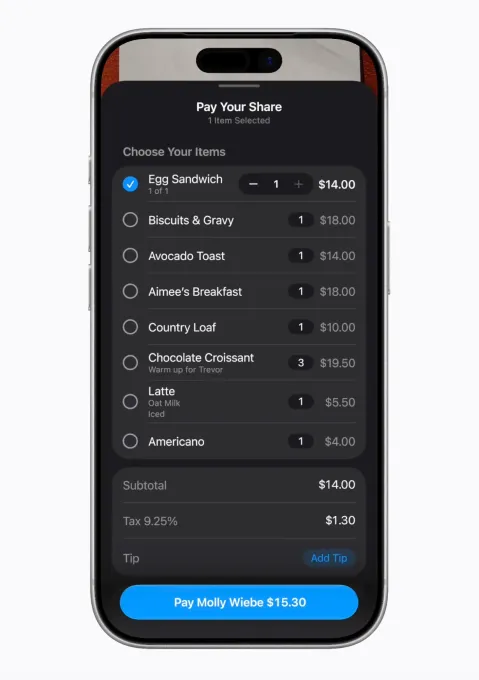
The bill-splitting option is easy to use; it only appears when needed and works seamlessly with apps and services you already know, like Messages and Apple Cash. It’s also smart enough to calculate each person’s share of tax and tip, in addition to the cost of the items.
Password Updates
With password managers like Apple Passwords or third-party apps such as 1Password, Dashlane, and Bitwarden, you’ve likely created complex and hard-to-guess passwords. However, this is no longer enough to protect them. As numerous data breaches in recent years have shown, your passwords often fall into the wrong hands without your knowledge or consent.


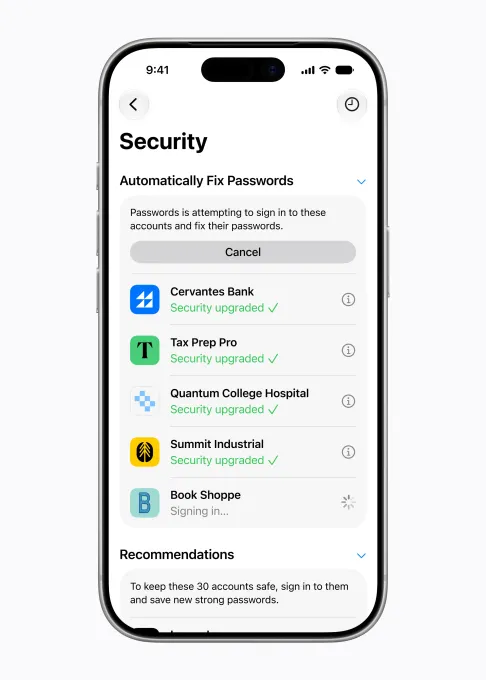
Apple’s new Password Updates feature uses artificial intelligence to automatically act on your behalf by identifying weak and compromised passwords, such as those discovered in data breaches. Instead of forcing you to manually update your passwords, this feature will allow you to browse the internet securely, log in, and replace your passwords with stronger versions.
One-Tap Suggestions in the Messages App
If you thought the automatic display of a website’s access code, right above the keyboard, was one of Apple’s best features, you’ll undoubtedly appreciate the new one-tap suggestions in iOS 27.
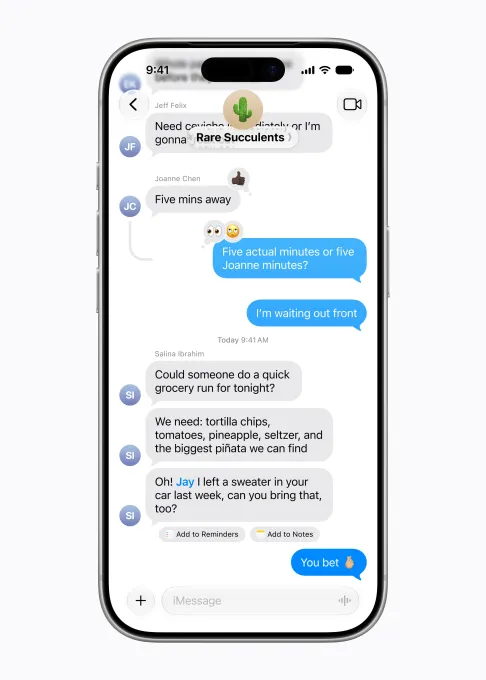
Thanks to Apple’s artificial intelligence, the Messages app offers various suggestions based on the topic of your conversations. For example, if a friend asks you to bring something to your next get-together, the suggestion might offer to add this request to your reminders. If someone asks you to share photos from an event, Apple’s artificial intelligence can suggest relevant photos by identifying keywords, locations, and people in your photo library. Or, if you’re planning a dinner or a business meeting, the Messages app can remind you to add the event to your calendar. And so on.
Again, this feature feels more like a practical tool than a simple demonstration of artificial intelligence.
Call Context
Another unannounced iOS 27 feature will simplify calls to business customer service by displaying the necessary information you might need to provide to the agent. For example, if you’re calling to inquire about a flight reservation, the confirmation code will appear directly on the call screen.
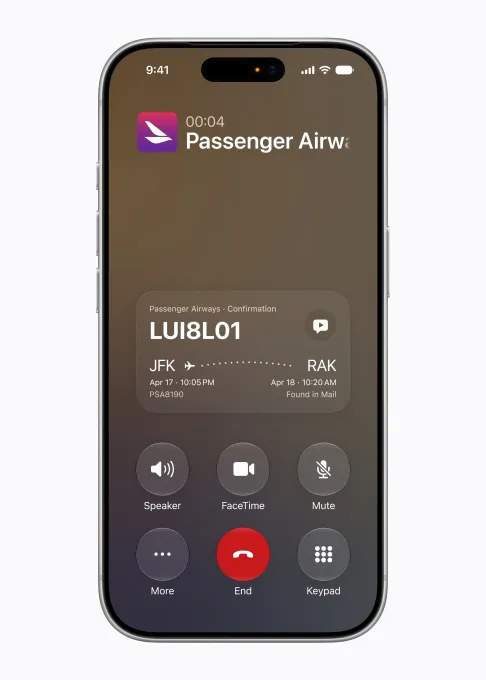
This feature uses Apple’s artificial intelligence to pull information from your emails in the Mail app and runs entirely on your device to ensure your privacy. Crucially, it’s a background tool; you don’t need to speak to an AI assistant to retrieve information—the necessary details are displayed automatically.
Adding Calendar Events
Apple now lets you add or edit calendar events simply by describing them in natural language, a feature inspired by those available for years in third-party apps like Fantastical. In the background, Apple’s artificial intelligence extracts contacts and locations and creates a title for the event. This feature simplifies adding events to your Apple Calendar without having to fill in any fields.
Vibe coding Shortcuts
The Shortcuts app is one of the most powerful for iPhone, but its technical complexity makes it inaccessible to many users. It allows you to schedule tasks and workflows, creating automations that simplify your daily life. However, using Shortcuts can be frustrating for novice users, who may need to consult online tutorials or other resources, such as Shortcuts galleries, to find the tools they need.
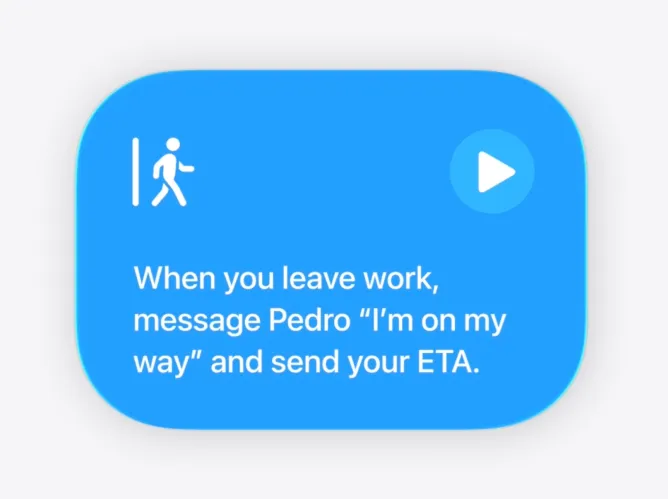
With iOS 27, all you have to do is describe what you want your iPhone to do. Apple suggests, for example, setting your alarm each night based on your activities for the next day, or opening your favorite productivity apps in a specific way when you connect the Magic Keyboard to your iPad. But there’s no need to delve into these technical details. Shortcuts can also perform other everyday tasks, such as automatically sending a text message to your partner when you leave work to let them know your estimated time of arrival, or turning on your porch lights when your DoorDash command arrives.
Less Home app spam
Smart home users know that their apps can overwhelm them with unnecessary notifications, often related to a single event. For example, if your partner comes home, opens the smart garage door, collects the mail, and then enters, you might receive a notification for each action, which can quickly become annoying. Thanks to Apple’s artificial intelligence in iOS 27, the Home app can understand multiple activities and their connections, and send a single notification about a general activity: someone comes home and closes the garage door.
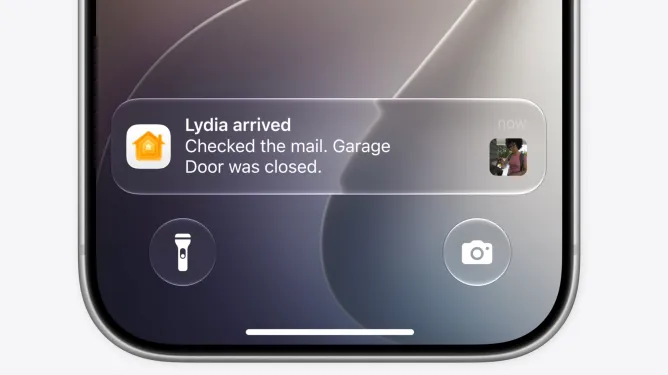
AI can also help you find the videos you need, such as a package delivery or another event, through search. The Home app will then display the most relevant videos at the top of the screen.
Organized tabs in Safari
Another, less obvious, AI feature is Safari’s Tab Organizer. Thanks to Apple Intelligence, Safari now understands what you’re viewing on websites and organizes your tabs by topic. For example, if you have several tabs open about a trip you’re planning, Safari can group them into a dedicated travel tab group. These tabs appear at the top of the browser, above the webpage, making them easily accessible when you want to resume your online research.
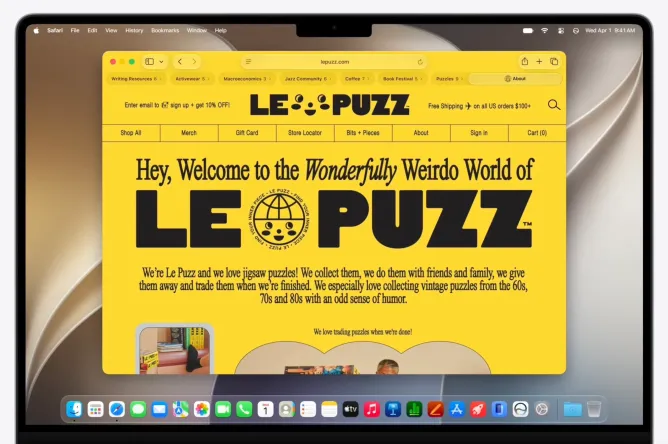
Apple specifies that the AI that performs this operation also respects your privacy, as it does not share your browsing data with anyone, not even Apple.